


Every renewal, the invoice arrives. You approve of it. The number is a little higher than last year, and that seems about right the team grew, after all.
If you ask “are we overpaying for Google Workspace?“, you aren’t alone. But if someone asked you today how many Google Workspace licences (or unused Google Workspace licenses) your organisation is paying for, how many are actually in use, and what the gap between those two numbers costs you, could you answer?
Most finance and operations leaders can’t, not because anything is being mismanaged, but because that information has always lived in an admin console they don’t have a reason to open. That’s about to change.
Why the gap forms in the first place
When an employee leaves, IT usually suspends the account rather than deleting it the right call, since it preserves the mailbox, keeps files accessible, and buys time for a proper handover.
What rarely reaches the person paying the bill: suspended Google Workspace accounts are still billed. Suspending stops someone using it, but unless you transition to a Google Workspace archived user license, it does not stop licence, and that licence is still billed.
Suspending stops someone using it, but does not stop you from paying full price for it.
A new hire starts, and because nobody’s tracking what’s sitting idle, IT buys another seat rather than performing Google Workspace license reassignment for the new employee. When a finance manager exclaims “I got charged for too many users in Google Workspace!”, this exact scenario is usually why, adding the new licence rather than a recycled one. Repeat this across a normal year of turnover and the gap between what you’re billed for and what’s in use grows quietly, in one direction, with nobody noticing it.
Learning how to reduce SaaS license waste and reduce Google Workspace costs isn’t a decision anyone intentionally delays; it’s a visibility problem. And visibility is exactly what’s been missing.
Why This Hasn’t Been Fixable Until Now
It’s not that Google Workspace renewal cost optimization is complicated. Performing Google Workspace seat reassignment to assign an idle licence to a new hire, instead of buying another one is a two-minute task. The problem has always been finding the idle licence in the first place without running a manual Google Workspace license audit, buried in an admin console, invisible to the person who’d actually want to act on it.
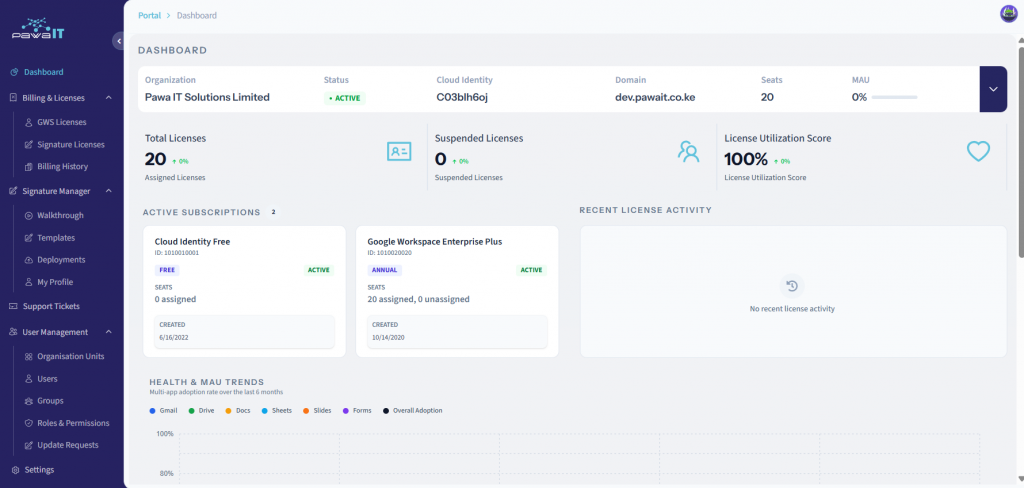
This is precisely the gap our new customer portal closes. Its dashboard gives you one screen showing your total licences, which are active, which are suspended, and how your usage is across the available apps. Available whenever you want to check, not only when you request a report.
The moment you can see an idle licence, reassigning it stops being a hypothetical best practice and becomes a five-minute task you actually do: open the dashboard, find the unassigned seat, assign it to your new hire.
That’s the mechanism. Visibility turns a slow leak you can’t see into a seat you reuse on purpose.
Why It Matters More on a Commitment Plan
Here’s the nuance that matters for how much this is worth to you. Understanding the Google Workspace annual vs flexible plan model is key. Subscriptions typically run on a Flexible Plan (pay per active user, adjust anytime) or an Annual/Fixed-Term Plan (a committed licence count for the term, at a lower per-user rate).
On a commitment plan, you can add licences anytime, billed prorated for the remainder of your term, but you generally cannot reduce your committed count until renewal.
That constraint is exactly why the portal’s dashboard matters more than a one off audit would. If you discover nine idle licences in March, you can’t shrink this term’s bill, but every one of those nine seats can absorb a new hire between now and renewal at zero extra cost, instead of your commitment climbing to more licences you didn’t need to add.
The savings isn’t a smaller invoice this month. It’s a renewal figure that reflects your real headcount instead of years of quietly accumulated drift, and you only capture it if you can see the idle seats before you’d otherwise buy new ones.
What Changes for You, Concretely
Before the portal, catching this required asking us for a report and reading it once a quarter, if that.
Now:
- You can check any time, not just when you remember to ask. The dashboard is always current.
- Reassignment is something you or your admin can do directly from the same screen where you spot the idle seat, no back-and-forth required to act on what you’ve just seen.
- Your renewal conversation changes. Instead of approving a number you can’t interrogate, you’re walking into it already knowing whether your licence count matches your actual team.
None of this requires you to become an expert in Workspace admin. It requires one screen, and a habit of glancing at it before you approve anything.
The real question isn’t “are we overpaying”
It’s “would we know if we were?” Until now, the honest answer was probably not.
That’s the gap the Customer portal exists to close, not by changing how licensing works, but by finally letting you see it clearly enough to act.