

This month, let’s take a deep dive into a transformative, yet elegantly simple, evolution in data analytics: Looker’s Conversational Analytics API. For years, the goal has been to make data accessible to everyone, moving from complex query languages to intuitive dashboards. Now, Google Cloud is taking the next logical leap by allowing you to simply talk to your data. This new API, now in public preview, is not just an incremental update; it’s a fundamental shift in how businesses can empower their teams, embed intelligence into applications, and ultimately, make data-driven decisions at the speed of thought.
Why is Conversational Analytics a Game-Changer?
Imagine your data as a vast, comprehensive library. Traditional BI tools give you a map and a library card, allowing you to find the information you need. Conversational analytics, however, gives you a personal librarian—an expert who understands your questions, retrieves the precise information, and even helps you understand it in context. This new paradigm is critical for several reasons:
- True Data Democratization: It breaks down the final barrier between complex data and non-technical users. A sales manager shouldn’t need to learn a BI tool to ask, “Which of my reps in the western region are on track to hit their quarterly quota?”; they should just be able to ask the question. This API makes that possible.
- Eliminate Context Switching: Productivity is lost every time an employee has to leave their primary application (like a CRM, ERP, or even Slack) to hunt for data in a separate dashboard. By embedding conversational analytics directly into these workflows, users get instant, in-context answers, allowing them to make decisions and take action immediately.
- Go Beyond the Dashboard: Dashboards are powerful, but they are inherently limited to pre-defined questions and visualizations. Conversational analytics allows for ad-hoc querying and exploration, enabling users to follow their curiosity and uncover insights that a static dashboard would never reveal.
- Build Smarter, Data-Powered Applications: For developers, this API is a toolkit for building the next generation of intelligent applications. You can now create custom, AI-powered data experiences for your customers and employees, making your products stickier and more valuable.
The Engine Room: How the API Translates Language to Insight
This isn’t a simple text-to-SQL gimmick. The Conversational Analytics API is a sophisticated system built on three core pillars of Google’s advanced AI and data technology.
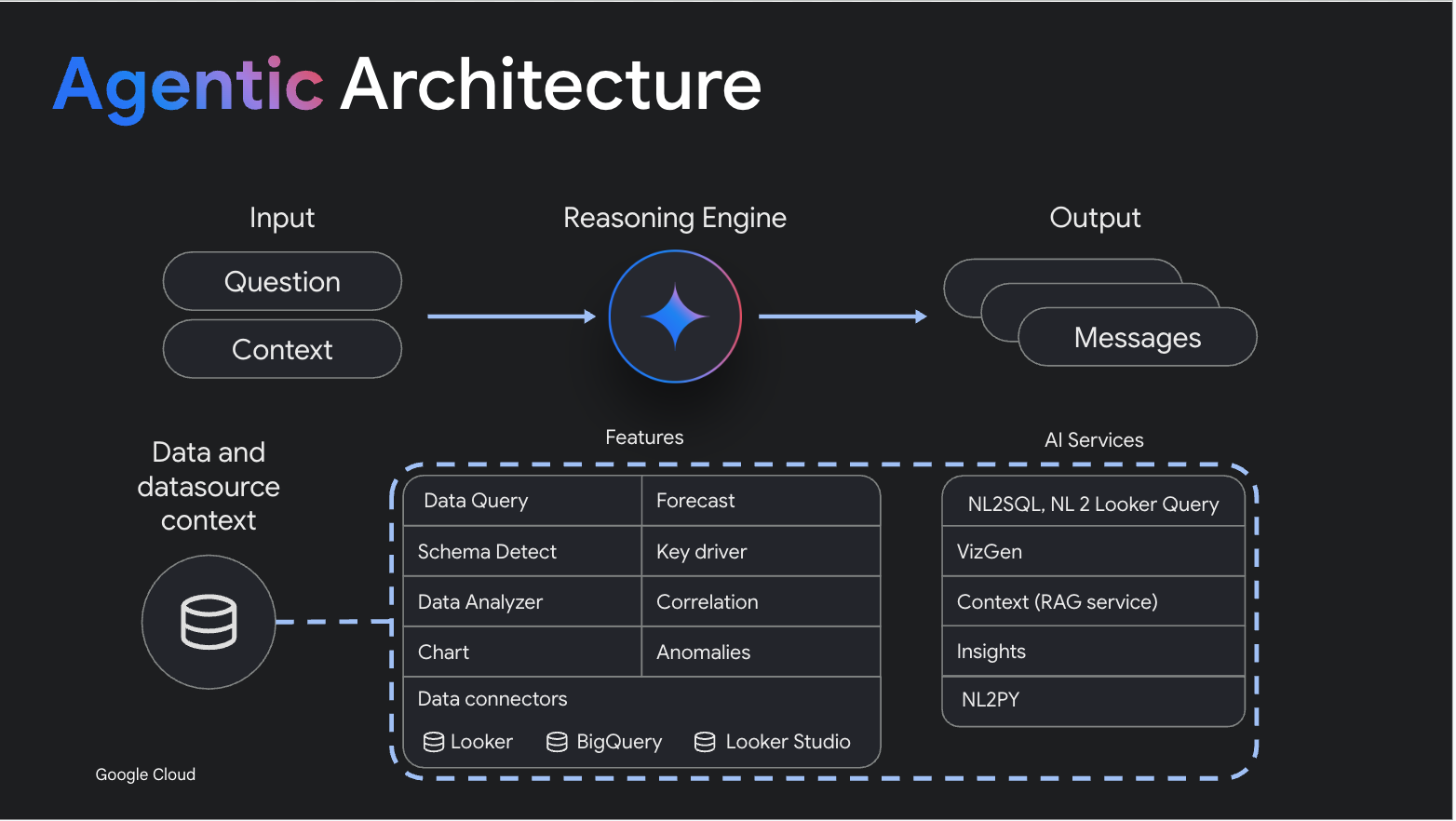
- An “Agentic” Architecture: The API functions as an intelligent “agent.” It doesn’t just translate your question; it perceives the request, reasons about the best way to answer it, and then acts by using a suite of available tools. These tools include a powerful code interpreter for complex calculations, advanced charting capabilities to visualize the data, and, of course, the ability to generate precise queries. This allows it to handle multi-step, complex analytical tasks.
- Grounded in Looker’s Semantic Layer: The true power and reliability of the API come from its integration with Looker. The Looker semantic model (LookML) acts as a single source of truth for all your business logic, metrics, and data definitions. When you ask a question, the API doesn’t guess what “revenue” or “active customer” means; it knows, because it’s defined in your trusted semantic layer. This grounding dramatically reduces the risk of AI “hallucinations” and ensures that the answers are accurate, governed, and consistent.
- Context-Awareness through RAG: The API uses a technique called Retrieval-Augmented Generation (RAG) to understand the unique context of your business. It learns from metadata, your past query history, and other contextual clues to provide answers that are not just technically correct, but genuinely relevant to your intent. This means the more you use it, the smarter it gets.
Best Practices for a Smooth Transition
To ensure your journey into conversational analytics is successful, we recommend taking the following actionable steps:
- Strengthen Your Semantic Foundation: The quality of your conversational insights depends entirely on the quality of your Looker semantic model. Before diving in, ensure your LookML is well-structured, clearly defines all key business metrics, and is trusted by your organization.
- Identify High-Value Use Cases: Start small and target a specific workflow where conversational AI can have a significant impact. This could be embedding a query interface into your internal sales portal or creating a Slack bot for your marketing team to track campaign performance.
- Design for the User Experience: Think about how users will interact with this new capability. A simple chat window is a great start, but also consider how to present the results (e.g., charts, text summaries, data tables) in a way that is easily digestible within the host application.
- Iterate and Gather Feedback: Treat this as an iterative process. Launch a proof-of-concept to a small group of users, gather their feedback on the types of questions they’re asking and the quality of the answers, and use that input to refine your implementation and your underlying LookML model.
Ready to Start the Conversation with Your Data?
The move towards conversational analytics is a powerful step in making data a natural part of every employee’s daily workflow. By embracing these tools, you can move from reactive data analysis to proactive, in-the-moment decision-making.
We encourage you to review the API documentation and start brainstorming how this powerful new capability can be integrated into your business.
If you have any questions or require assistance in designing or implementing a conversational analytics strategy, please don’t hesitate to reach out to our team at Pawa IT. We are here to help you navigate these critical updates and optimize your Google Cloud environment.